Making MS Word Work

We did it. We wrapped up the research projects a few weeks ago (envision happy dance), and the papers even had a bibliography attached to each one.

Going through the notetaking and paper writing process with my 4th graders was a challenge. Getting them to format the papers correctly was excruciating. If your child is at an age where he is beginning to type documents for school, there are 6 word processing functions that I find make editing and publishing documents a whole lot easier.

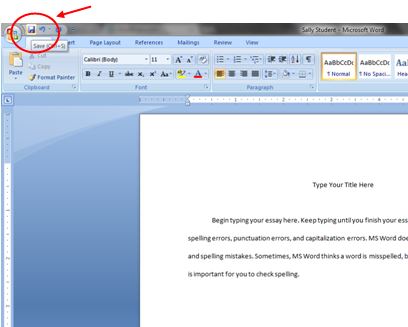
save as

Save As

Save As

  • Designate one folder where a student saves his documents all the time. My students have a dedicated computer they use in the classroom. There is a folder with their name on the desktop of their assigned computer. Every document a student types is saved into the same folder. Using the Save As feature, I show them how to navigate to their folder.
  • Parents, set up a folder for your child’s writing assignments ONLY on your home computer. Teach your child how to save in the same place every time.
  • I also recommend setting up a naming system. In my class, students always save documents as their name followed by key words from the project (TheRoomMom Barbie Research or TheRoomMom Aslan Essay).
select all

Select All

double space

Double Space

Double Space

  • Double space the entire document at one time. Students like to type a little, then play with formatting, then have mismatched spacing and fonts. After the entire document is finished, change the spacing at one time. I recommend the Select All function to highlight the entire document, then choose the double space (2.0) line spacing.
tab button

Tab

Tab Button

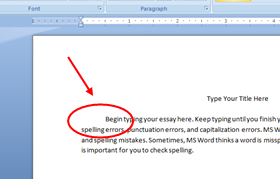
  • Always use the Tab button to indent when starting a paragraph. When students use the space bar, words are out of alignment and look messy. I dislike messy.

Ctrl+c (copy), Ctrl+x (cut), Ctrl+v (paste)

  • These are the 3 most valuable shortcut keys in my opinion. Rather than messing with right clicking which inevitably ends up de-highlighting text, I teach my students these 3 shortcuts. I also use these shortcut keys for copying, cutting, and pasting images.
formatting tool

Formatting Button

Formatting Button

  • This is a teacher’s best friend. If students have words jumping all over the page, turn on the formatting tool. It shows all the background buttons a student has pushed in the document. If a student pressed the space bar a thousand times to move something to the center, it shows little dots. If a student hit enter multiple times, a paragraph symbol (backwards looking P shows up). If a student hit  the tab button, an arrow appears. I can fix a lot of funky formatting in a student’s document by turning on the formatting key.
undo

Undo

Undo Typing

  • And finally, when all else fails, hit the counterclockwise arrow and undo the most recent typing!

What is your best keyboarding or formatting tip for students?

Ready to Research?


Each year, I approach my 4th grade non-fiction research unit with equal parts excitement and dread. I am excited because along with my students, I always learn something new about an American business founder. I dread the unit because it involves a research paper, and it takes all of my teacher super powers not to jam a child into his locker when he looks up at me and says, “I’ve read EVERYTHING and there is no information about Henry Ford.” Fortunately, I also teach common prefixes, so I can calmly remind the student that REsearch means search again.

research folder for students

Coaching these kids through their first research essay is a good thing, and they acquire so many skills because of it. As much as the process pains me, I repeat it every year. I have used this research system with 4th grade, 6th grade, and 9th grade. It works for every age on any topic in almost every subject area.

Prepping the Research

Before letting kids loose on the Internet to find facts, focus on some sub-topics. In my classroom, students write 3-5 open ended questions they will try to answer. Parents, if you are working with a child at home, brainstorm some sub-topics to give the research a direction.

  • An opened ended question is one that requires multiple sentences to answer. Instead of asking, “When did Ruth Handler sell the first Barbie doll?” ask, “How did Ruth Handler get the idea for a Barbie doll?”
  • Use the 3-5 questions or sub-topics for research. Now, every time a student opens an article, he will be trying to answer one of his questions. Rather than writing random facts, students are actively searching for information that is related to a specific idea about the main topic. In addition, the questions provide key words to help narrow Internet searches and make the research more efficient.
  • The idea is that a student tries to answer all of his questions with one source. Then, the child tries to answer the same questions with a new source. Repeat with a third source. If the child is getting the same information in all 3 sources, it is reliable information. If a student can’t answer any question, he moves on to a fourth source… or a fifth. I have been known to repeat the fact that websites and reference books will not have big red arrows and highlighted words pointing to the exact information someone might need. A student might have to summarize, interpret, and infer reading material. The information will not be provided in the same tidy way as a textbook.

student ben and jerrys research folder

The Research Folder

Create a way for students to contain all of their information, so it does not get lost traveling from school to the locker to home.

  • Give students a manila folder with pockets to hold notecards. Seal business envelopes, cut them in half with a paper cutter, and glue them to the envelope. I also print a short list of Internet reference links and sample bibliography formats, which we glue to the folder as well.
  • Students write each question or sub-topic on one pocket. Any time a student finds a fact related to one question, they write the note on the notecard and store it in the appropriate envelope. Now all related notes are grouped together in a handy carry case.

research folder A notes

Sources and Bibliography

This is very difficult for my students since it is their first serious attempt at a bibliography. Having the pre-printed bibliography page with samples pasted to the manila folder helps.

  • As students take notes, they must record the source at the same time. Do not put a source away (or click it closed) without writing the information needed for a bibliography.
  • Code all notecards from one source with some sort of symbol or letter. All “A” cards would relate to one source. Or, all cards with a star would relate to one source.

research folder bibliography

Taking Research Notes

I have to model note taking for my students, and we practice before the project starts. You may not have to go through this step, but it is still a good idea to give some reminders about note taking. I have a few rules I ask the kids to follow.

  • Never write more than one line at a time. This reduces plagiarism since students can’t copy large chunks of text. They must summarize and re-word to fit information into one line at a time.
  • Never write a word on a notecard you do not understand. Look up the unfamiliar word, write a synonym, or explain the word.
  • Avoid Wikipedia if at all possible. Anyone can post information on Wikipedia, so it is not always reliable. Kids like to go there first and then quit. I tell my students that Wikipedia is off limits (audible groans detected immediately).

research folder A notes2

Preparing the Research Paper

If students have sufficient notes, the paper is easy to organize.

  • If students are taking notes related to the questions or sub-topics, notes will be organized and ready to be translated into paragraphs as part of an essay. The organization happens while researching rather than having to sort notecards later and hope that central ideas emerge from the pile of notes.
  • Create an introductory paragraph using the open ended questions or subtopics. Those ideas become the body sentences for the first paragraph.
  • Notes from the first pocket will create the 2nd paragraph that follows the intro and so on.
  • If any extra fun facts are collected, incorporate those into the first or last paragraph.
  • This is a good time to practice or introduce Transition Words

research sample paragraphs

My system is by no means foolproof, but it is more efficient than the way I learned to prepare a research paper. To purchase my Non-Fiction Business Unit with the full research paper directions CLICK HERE.

research folder notecards in pocket

Fun Foldables

Crazy things happen to my students when I tell them that we are going to make booklets in class.  They do not even recognize that there will be writing required to fill the booklet. Their attention is focused completely on the class set of scissors, stack of paper, and big bin of assorted colored pencils. I have a handful of favorite foldable booklets that I am sharing below. I also included a new one I am trying this year with my poetry unit called a tunnel booklet.

Teacher Note: To fold a piece of paper the hamburger way is to fold any rectangular piece of paper in half the short, fat way. An 8 1/2″ x 11″ piece of paper would become 5 1/2″ x 8 1/2″. To fold a piece of paper the hot dog way is to fold any rectangular piece of paper in half the long, skinny way. An 8 1/2″ x 11″ piece of paper would become 4 1/4″ x 11″. The top of the tent is the folded edge of the paper. If you were to stand your folded piece of paper up on the table like a tent, the part at the top is the edge you usually need to cut. Don’t ask me who came up with this terminology, but it saves me a lot of messed up pieces of paper.

Parent Note: Any of these booklets can be adapted for scout projects, book reports, science reports, or home schooling.

Tiny Books

I use these for an activity with Danny the Champion of the World by Roald Dahl. When we read the chapter about Danny’s granddad’s great pheasant poaching methods, the students choose one of the crazy poaching methods from the story. The students break the poaching method into steps and write the steps with illustrations into the Tiny Books to create a “How To” booklet. This is a great way to introduce technical writing and procedures (anyone prepping for science fair?).

Materials:

  • basic white copy paper, 8 1/2″ x 11″, (one per student)
  • scissors
tiny book step 1

Step 1: Fold one piece of paper in half the hamburger way. Repeat two more times. Unfold the paper and make sure you have 8 rectangles on the paper.

tiny book step 2

Step 2: Fold the paper the hamburger way again, one time. Your paper will be 5 1/2″ x 8 1/2″ with 4 rectangles showing.
Step 3: From the folded edge of the paper, cut down the middle along the fold line to the center of the paper.

tiny book step 3

Step 4: Open the paper flat. Fold it one time the hot dog way.

Step 5: Hold each side with one hand and push towards the center until your fingers meet. The center of the paper will push out creating 4 flaps.

Step 5: Hold each side with one hand and push towards the center until your fingers meet. The center of the paper will push out creating 4 flaps.

Step 6: Press down, so pages are flat. The finished booklet is 6 pages.

Step 6: Press down, so pages line up into the booklet shape. The finished booklet is 6 pages.

Burrito Books

We make these booklets for a lot of novel studies in my class. I recently used them while reading The Bread Winner by Arvella Whitmore. I created a Bread Winner Burrito Book Template and made a gazillion copies (front and back) that gave the students space to write a gist statement (one page summary of a chapter), character notes, and historical facts for each chapter in the book. I also use these booklets for point of view journals. This activity works well for The Incredible Journey by Sheila Burnford and The Lion, the Witch, and the Wardrobe by C.S. Lewis. At the beginning of the book, students select one main character. After reading each chapter, the students re-tell the chapter in the first person from the point of view of their chosen character. I mentioned this writing activity before in my Novel Ideas post.

Materials:

  • basic white copy paper, 8 1/2″ x 11″, 6 sheets per student? (1 piece of paper = 4 booklet pages)
  • scissors
  • construction paper, any color, 1 per student (optional– can be used to make a cover for the booklet)
  • glue stick if adding construction paper book covers
Step 1: Divide your paper into two even piles, line up the corners, and fold both piles in half the hamburger way.

Step 1: Divide your paper into two even piles, line up the corners, and fold both piles in half the hamburger way.

Step 2: Pick up one folded pile of papers. On one end, make a 1-inch cut along the end (this is the top of the tent). Repeat on the other side.

Step 2: Pick up one folded pile of papers. On one end, make a 1-inch cut along the end (this is the top of the tent). Repeat on the other side. Set aside.

Step 3: Pick up the second pile of papers. Starting about 1-inch from the edge of the paper, cut a long skinny rectangle out of the center of the page. Stop 1-inch before the other end of the paper. This is the same as cutting a Valentine heart out of the center of a piece of paper.

Step 3: Pick up the second pile of papers. Starting about 1-inch from the folded edge of the paper (top of the tent), cut a long skinny rectangle out of the center of the page. Stop 1-inch before the other end of the paper. This is the same as cutting a Valentine heart out of the center of a piece of paper.

Step 4: Keeping the two piles of paper separate, open them flat. Pick up the pile with the flaps at the end and roll it gently like a hot dog. Insert the rolled papers into the center hole of the other stack of papers.

Step 4: Keeping the two piles of paper separate, open them flat. Pick up the pile with the cut flaps at the end and roll it gently like a hot dog. Insert the rolled papers into the center hole of the other stack of papers.

Step 5: Shaking a little, unroll the hot dog papers until they fit into the notch at the bottom and top of the pages.

Step 5: Shaking a little, unroll the hot dog papers until they fit into the notch at the bottom and top of the pages.

Step 5: (continued) If the pages won't lie flat, you may need to adjust the cut flaps and make them a little longer.

Step 5 (continued): If the pages won’t lie flat, you may need to adjust the cut flaps and make them a little longer.

Step 6: Press pages in half the hamburger way to form the booklet. You can fold construction paper in half the hamburger way and glue the first and last page of the burrito book into the construction paper to make a cover (recommended).

Step 6: Press pages in half the hamburger way to form the booklet. You can fold construction paper in half the hamburger way and glue the first and last page of the burrito book to the construction paper to make a cover (recommended).

Pop Up Books

Kids get really creative with the cutting on these pages. Once you teach the basic pop up, they quickly discover how to add more details. Currently, I use these with tall tales. We read a few picture books (McBroom and the Big Wind by Sid Fleischman, A Fine, Fine School by Sharon Creech, and Those Darn Squirrels by Adam Rubin) and discuss the basics of a tall tale. Students then write their own tall tale, break the story into about 6 sections (which will become the text for each page), and book production begins.

Materials:

  • basic white copy paper, 8 1/2″ x 11″ (~6 pieces per student)
  • class set of scissors
  • class set of glue sticks
  • construction paper (1 piece per student)
  • colored pencils or markers
Step 1: Fold one piece of paper in half the hamburger way. Near the center of the folded edge of the paper, cut two lines each the same length (about 1" long). The cuts should be about 1 1/2" apart. You may want students to mark cut lines with rulers when you first get started.

Step 1: Fold one piece of paper in half the hamburger way. Near the center of the folded edge of the paper (top of the tent), cut two lines each the same length (about 1″ long). The cuts should be about 1 1/2″ apart. You may want students to mark cut lines with rulers when you first get started.

Step 2: Open paper and poke finger into the cut section in the center of the paper and gently pull forward to make a stair step.

Step 2: Open paper and poke finger into the cut section in the center of the paper and gently pull forward to make a stair step.

Step 3: Fold the paper down again like a hamburger and crease your stair step. Open the page and stand upright to check that the fold is even.

Step 3: Fold the paper down again like a hamburger and crease your stair step. Open the page and stand upright to check that the fold is even.

Step 4: Begin creating illustrations on the page. You will have one larger element that is cut out of paper and glued to the front of the stair step. Create a background on the top/back of the page. Write the story text on the bottom/front of the page.

Step 4: Begin creating illustrations on the page. You will have one larger element that is cut out of paper and glued to the front of the stair step. Create a background on the top/back of the page. Write the story text on the bottom/front of the page.

Step 5: When one page is completed, use a new piece of paper and create a new pop-up page. Do you second page of illustrations and text. When pages are ready, you will attach the back of the bottom of the first page to the back of the top of the second page. Use a glue stick and run glue around the outside edges only. If you glue to close to the center, it might stick down the pop ups.

Step 5: When one page is completed, use a new piece of paper and create a new pop-up page. Do the second page of illustrations and text. When pages are ready, you will attach the back of the bottom of the first page to the back of the top of the second page. Use a glue stick and run glue around the outside edges only. If you glue too close to the center, it might stick the pop ups to each other.

Step 6: Continue until all pages are complete and attached. The back/top of the first page and the back/bottom of the last page can be glued inside construction paper for a cover.

Step 6: Continue until all pages are complete and attached. The back/top of the first page and the back/bottom of the last page should be glued inside construction paper for the cover. Illustrate the cover too.

double pop up book

Extension: Once students master the single pop up, encourage them to try double pop ups or other size pop up boxes.

Tunnel Books

I found this cool pin on Pinterest (thank you Cheryl at Teach Kids Art) and decided to add this activity to my poetry unit. The students were going to be writing Haikus anyway, so it seemed like a good project. Plus, my poetry unit is a few years old, and I needed something new to freshen up the content. I think I could also use these as character tunnels. A picture of the main character would go on the back panel, and the student could document changes in the character with each frame.  Hmmm, I can see this showing up in my Island of the Blue Dolphins by Scott O’Dell unit in the spring– stay tuned.

Materials:

  • 4″ x 6″ postcard, horizontal picture, one per student
  • 4 per student 4″ x 6″ white notecards
  • 4 per student 4″ x 6″ white notecards each pre-cut into 2- 3″ x 4″ pieces*
  • 1 per student 3″ x 5″ notecard, cut to 2 ½”x 4 ½” (color other than white if pos­si­ble, use as a tem­plate for trac­ing the opening)*
  • scis­sors
  • glue stick
  • pen­cil and eraser
  • black fine tip pen (Sharpie works well)
  • col­ored pencils

* I recommend doing this step ahead of time for your students with the paper cutter in the teacher workroom.

Prep: Make the hinged sides of your book by fold­ing each of your 3”x4” index cards accor­dion style. Fold in half the hot dog way (“moun­tain fold”), then fold each loose edge up (“val­ley fold”) to line up with the fold in the mid­dle.

Prep: Make the hinged sides for your book by fold­ing each of your 3”x 4” index cards accor­dion style. Fold in half the hot dog way (moun­tain fold), then fold each loose edge up (val­ley fold) to line up with the fold in the mid­dle. I used lined notecards to illustrate direction of the folds on the hinges better. Trace the 2 1/2″ x 4 1/2″ rectangle on the center of the 4 remaining notecards.

Step 1: Write one line of your haiku across the top of each of 3 cards, and your title (if you want one) across the other. Trace with Sharpie.

Step 1: Write one line of your haiku across the top of each of 3 cards, and your title (if you want one) across the other. Trace with Sharpie. Illus­trate each page of your book by choos­ing ele­ments from the post card and repeat­ing them on the edges of each page. Keep most of your design along the top, bot­tom, and sides but allow some ele­ments to over­lap into the cen­ter sec­tion. Color with col­ored pen­cils.

Step 2: Cut away the cen­ter sec­tion of each page. By pinch­ing the mid­dle of each page, with­out creas­ing to the edges, you can snip into the cen­ter to cre­ate an open­ing for your scis­sors.

Step 2: Cut away the cen­ter sec­tion of each page. Pinch­ the mid­dle of each page, with­out creas­ing to the edges, so you can snip into the cen­ter to cre­ate an open­ing for your scis­sors.

Step 4: Cut­ around any ele­ments that extend into the mid­dle.

Step 3: Cut­ around any ele­ments that extend into the mid­dle.

Step 1: Put a lit­tle glue along the inside edge of two of your hinges and place them on the left and right sides of the back of your post card. Repeat this step for each 4" x 6" card.

Step 4: Put a lit­tle glue along the inside edge of two of your hinges and place them on the left and right sides of the back of your post card. Repeat this step for each 4″ x 6″ card.

Step 5: Assem­ble your tun­nel book, work­ing from the back (line 3 of your haiku) to the front, glu­ing the back of each hinged page to the hinges behind it.

Step 5: Assem­ble your tun­nel book, work­ing from the back (line 3 of your haiku) to the front, glu­ing the back of each hinged page to the hinges behind it.

Haiku Tunnel Poem Finished (top view)

Haiku Tunnel Poem Finished (top view)

Haiku Tunnel Poem Finished (front view)

Haiku Tunnel Poem Finished (front view)

Two Gifts in One (Day 7)

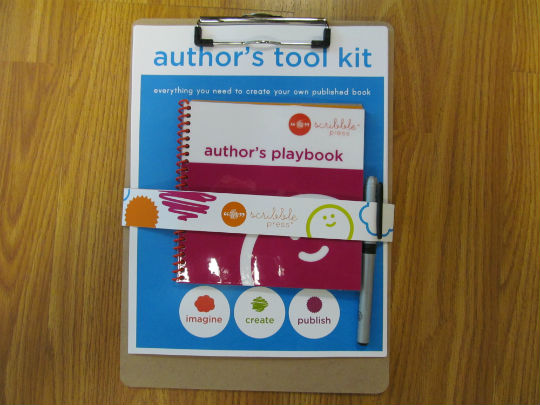
My mom discovered the Scribble Press Store in New York City and picked up an Author’s Tool Kit ($28.95) as a Christmas present for my son a few years back. He LOVES writing stories, and this was an awesome gift idea. It is a design your own book kit. There are a variety of page layouts included in the kit, and the child writes a story and illustrates it. The kit also includes templates for a cover page, dedication page, and an about the author page. Once the pages are completed, you mail them back to Scribble Press, and they professionally bind the book. The book binding fee was included with our gift, but you have the option to order extra copies. Wrap the extra copies and give the finished books as a gift at the next holiday. It is the gift that gives back!

If you happen to live in New York City, you should look at the class and party options at their store. I also noticed an app and online book functions on the website that would be great for teachers (or parents).

The Write Way

I have not cracked the code, but I am coming close to a grammar system that (almost) guarantees students will write in complete sentences. When I started a 6th grade teaching job about 15 years ago, my teammate handed me a binder called Sentence Writing Strategies**. I attended the training for it at University of Georgia, and it has changed my grammar world. Teachers, if you can attend a training session in your area, run– don’t walk!

I am able to adapt the key elements of the Sentence Writing Strategies and fold it into whatever grammar textbook my school has at whatever grade level I am teaching. Basically, I use my grammar textbook in the Sentence Writing Strategies order.

Step 1: Teach some basic parts of speech and then begin introducing each sentence type (simple, compound, complex, and compound-complex). The steps in My Grammar Plan take me about 6-8 weeks with 4th graders. The order is the key!

Students mark prepositional phrases, infinitives, verbs/helping verbs, and subjects in every sentence– IN THAT ORDER– every time. If students can do this well, they can more easily identify all of the other “stuff”. Parents, if you are working with a child at home who struggles with complete sentences or identifying parts of sentences, following these steps will help.

Step 2: Begin simple sentences. Writing Strategies gives you formulas for simple sentences. Each simple sentence (independent clause) must meet 3 criteria. A sentence must have a subject, a verb, and make sense on its own.

Step 3: Build the folders. Is anyone familiar with magnetic poetry? I had a set of the little word magnets on my refrigerator for a long time and thought my students could move word pieces a la magnetic poetry around to create sentences. My students know the definition of a simple sentence and can identify the parts of a simple sentence, but actually executing the simple sentence was proving to be a bit of a challenge.

I sealed white mailing envelopes and cut them in half to make pockets. You could use coin envelopes or library card pockets too. You will need to cut the height down some, so little fingers can reach into the pockets. My pockets are about 2 1/2 in. tall. I glued the pockets to the left side of a manila folder and labeled them. I created a sentence building space with directions on the right side of the folder. In each pocket are small cardstock chips with the word choices for each part of the sentence we know to date.


I put the students in groups of 2 or 3 and gave them each a folder. The students used the word chips in the folders to build simple sentences. After they created a sentence, they transferred the words to a piece of notebook paper and marked the sentence to check for any errors.

My next plan for grammar domination is to expand the folders. I thought I could add pockets for adjectives and adverbs. I can keep adding to the sentence types, so students can build compound and complex sentences… then I will need coordinating and subordinating conjunctions. The possibilities are endless. What else can I do with my folders?

** For more information about the University of Kansas Center for Research on Learning,  Strategic Instruction Model®, search Learning Strategies: Sentence Writing – Fundamentals in the Sentence Writing Strategy and Proficiency in the Sentence Writing Strategy or click on the link above.