Word Trains

Bifocals Word Train bigger

Some of my favorite teaching ideas happen on the fly. My students completed the final lesson in our vocabulary book this week. The vocabulary book is based on Latin roots, common prefixes, and suffixes. Now that it is the end of the year and our “root bank” is full, students have been noticing words all over the place that are combinations of the roots and prefixes we studied all year (Yeah!– something stuck).

So, here is what happened. We studied the root “loc” this week, which is in the word “locomotion”. “Loc” means to move from place to place. A student recalled that we already knew the root “mot” meaning to move or to do. And then the game began.

Have you ever played 6 degrees of Kevin Bacon with movie actors? The Word Train game is the nerdy teacher variation of that game.

  1. You begin with a word that contains 2 known parts like DISORGANIZED (dis and organ).
  2. Connect it with another 2+ part word that shares a root, prefix, or suffix from the original word like ORGANIST (organ and ist).
  3. Add a third word that shares the newly added word part like ACTIVIST (ist and act).
  4. Keep going from there by adding REACT then RECAPTURE then CO-CAPTAIN then COOPERATE then OPERATOR.
  5. To really play like the Kevin Bacon game and test a student’s word knowledge, give them the first word and the last word in the word train and ask them to create the connection. For example, try to get from reheat to illiterate.
Capture Word Train

Click on the picture to view the sample

This was a great vocabulary review, and the students got supercompetitive (super is a prefix from our list, by the way). We have standardized testing coming up, and I am trying to practice reading comprehension and vocabulary skills. This activity forced the students to look at word parts and give definitions based on the parts. It is much more strategic than memorizing definitions.

How many words can you connect? My record is 9. I am sure I could go further if I pulled any word root, not just the ones from my 4th Grade Common Prefix, Root, and Suffix List. Can you beat me? My students did. To download the complete lesson plans for free, click here.

A Word Train

Click on the picture to view the sample

I apologize for the tiny pictures. I kept resizing, and I could not get them to appear larger in the post. If any web experts have advice, please share.

Going on a Field Trip

field trip

The bulk of the field trips my teammate and I schedule occur during the last 6 weeks of school. This includes a 3 day overnight trip related to our science curriculum. If it were up to me, I would not have any field trips and definitely not any overnight trips.

When my students are in the confines of the school building, I have full control (more or less). As soon as I leave campus with my students, all kinds of untold dangers are lurking around every corner, and the number one thing on my mind is getting these students back to their families in the same condition in which they left.

We have parent volunteers accompany us on all of our expeditions and let me tell you, I am slightly picky about parent volunteers. It is not always first come, first serve in my classroom. This is what I need from parent volunteers.

Charlestowne Landing

  1. Have a cell phone in case of emergency but do not use it on the field trip. Do not make a phone call or check e-mails or texts. If you have a job that requires you to check in often, do not volunteer to chaperone.
  2. Spread out from the other parents. If all parents clump together at the back of the group, you can’t help with crowd control, discipline, and safety, and that is why I invited you along.
  3. Be at the pick up and drop off locations on time and as instructed. If you decide that it would be nice to take the kids in your car out for ice cream on the way home, or if you drive them to your house for pick up at the end of the day rather than back to the school for regular carpool line, you just created a giant liability issue for the school and me. If students ride together on a bus, this problem is eliminated!
  4. It is OK for you to discipline students if they wander away, are too loud, or are rude to the tour guide. I want your help in this area. If you are uncomfortable disciplining, let the teacher know. Please don’t sit back and watch the unacceptable behavior continue.
  5. Do not complain about school issues or faculty members on the field trip. This is not a time to vent any problems you may have with the school. It puts me in an awkward position, and it is poor manners. However, feel free to tell me what a great school year it has been.
  6. Do not try to have a parent/teacher conference while on the field trip. I can’t give you my full attention, and it is not exactly a private forum.
  7. DO enjoy yourself and this time with your child and his/her classmates. Field trips are supposed to be a little bit of fun. I do want parents who participate in the activities when appropriate and are engaged.
Here I am on our field trip related to our studies of Colonial America.

Here I am on our field trip related to our studies of Colonial America.

Managing parent volunteers on field trips for my classroom has made me more aware when I attend a field trip as the parent volunteer for my own children. I try to anticipate where a teacher might need back-up even if it is simply counting children and letting the teacher know everyone is present. Because, in the end, I always consider it a successful trip if I arrive back at school with the same amount of students I had when I left. What are your best (or worst) field trip stories? The teacher or parent version!

Making MS Word Work

We did it. We wrapped up the research projects a few weeks ago (envision happy dance), and the papers even had a bibliography attached to each one.

Going through the notetaking and paper writing process with my 4th graders was a challenge. Getting them to format the papers correctly was excruciating. If your child is at an age where he is beginning to type documents for school, there are 6 word processing functions that I find make editing and publishing documents a whole lot easier.

save as

Save As

Save As

  • Designate one folder where a student saves his documents all the time. My students have a dedicated computer they use in the classroom. There is a folder with their name on the desktop of their assigned computer. Every document a student types is saved into the same folder. Using the Save As feature, I show them how to navigate to their folder.
  • Parents, set up a folder for your child’s writing assignments ONLY on your home computer. Teach your child how to save in the same place every time.
  • I also recommend setting up a naming system. In my class, students always save documents as their name followed by key words from the project (TheRoomMom Barbie Research or TheRoomMom Aslan Essay).
select all

Select All

double space

Double Space

Double Space

  • Double space the entire document at one time. Students like to type a little, then play with formatting, then have mismatched spacing and fonts. After the entire document is finished, change the spacing at one time. I recommend the Select All function to highlight the entire document, then choose the double space (2.0) line spacing.
tab button

Tab

Tab Button

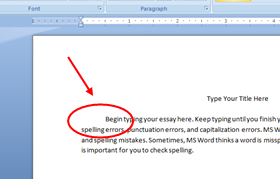
  • Always use the Tab button to indent when starting a paragraph. When students use the space bar, words are out of alignment and look messy. I dislike messy.

Ctrl+c (copy), Ctrl+x (cut), Ctrl+v (paste)

  • These are the 3 most valuable shortcut keys in my opinion. Rather than messing with right clicking which inevitably ends up de-highlighting text, I teach my students these 3 shortcuts. I also use these shortcut keys for copying, cutting, and pasting images.
formatting tool

Formatting Button

Formatting Button

  • This is a teacher’s best friend. If students have words jumping all over the page, turn on the formatting tool. It shows all the background buttons a student has pushed in the document. If a student pressed the space bar a thousand times to move something to the center, it shows little dots. If a student hit enter multiple times, a paragraph symbol (backwards looking P shows up). If a student hit  the tab button, an arrow appears. I can fix a lot of funky formatting in a student’s document by turning on the formatting key.
undo

Undo

Undo Typing

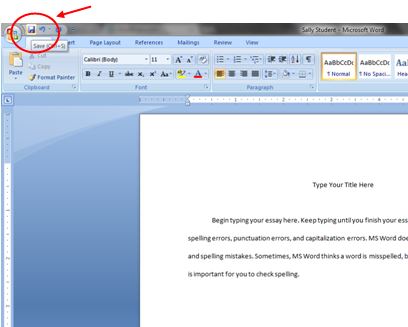
  • And finally, when all else fails, hit the counterclockwise arrow and undo the most recent typing!

What is your best keyboarding or formatting tip for students?

Teacher Appreciation Sirsee

DIY magnets

If you read my previous post about Teacher Appreciation Week, you know we organized a group gift of freezable meals for my daughter’s kindergarten teachers. We will be sending a little extra appreciation gift too. We made personalized magnets for the teacher’s white boards at school. I won’t lie to you; this little sirsee took some advanced planning.

I magnet things to the white board in my classroom all the time– attendance slips, papers without a student name, sample projects, just to name a few. I figured all teachers could use a good magnet. These little DIY magnets have a personalized thank you picture of the student, so the teachers will never forget the child– even if they try.

magnet supplies

Materials

  • scrapbook paper
  • clear glass stones or glass tiles (flat back)
  • Diamond Glaze
  • magnets (super strength)
  • photo address labels (pre-ordered)

Directions

  • A few weeks before you need the gift, make a sign that says “Thank You” and take a photo of your child holding the sign.

magnet thank you sign

  • I use Shutterfly, but any site with photo return address labels is fine. Order a sheet of return address labels with your “Thank You” photo in it. I have thought about other options for this, and I can’t come up with any. You need a tiny photo, and it needs to have permanent/sealed ink (like a sticker). I have tried printing my own photos on copy paper and photo paper, and the ink blurs when you use the Diamond Glaze. 

magnet labels

  • When the address labels arrive, cut the “Thank You” photo side away from the address label. I use a paper cutter and cut the photo so there is a small border around the edge. I tried to have a little thank you message printed in the address field thinking the whole sticker would fit under the stone– WRONG. Go ahead and print the photo with your real return address. If you use a paper cutter, the address side of the label is completely usable for any letters you mail. It’s kind of a two for one if you actually mail any letters.

magnet paper back

  • Put the stone on the scrapbook paper, flat side down, and trace a line around the edge. Cut out the shape of the stone and apply the “Thank You” photo sticker in the center of the scrapbook paper piece. My son squeezed a handwritten note onto the side of his magnet with the school year listed too.

magnet add sticker

  • Put a dot of Diamond Glaze in the center of the photo and press the flat side of the stone on top until the Diamond Glaze smooshes to the edge. Let dry. If the Diamond Glaze runs over, gently wipe with a damp paper towel. You may need to turn the stone upside down to let it dry.

magnet attach paper

  • Once the Diamond Glaze dries, put a small dot of Glaze on the back of the paper attached to the stone. Press the magnet into the center of the Glaze. Let dry completely. NOTE: You can’t have any run of the mill magnet for this job. You need super heavy duty magnet strength. The best part about these homemade magnets is the industrial strength pull. I found the super magnets at an art supply store, but I have seen them at my Ace hardware store and Michael’s Crafts. I like the small silver disc magnets, but I have also bought the black disc magnets.

super magnet

  • Instead of magnets, you could attach thumb tacks to the back with the Diamond Glaze and make a pushpin for the teacher’s bulletin board. I have also used these photo magnets as a gift for a grandparent, Mother’s Day, or Father’s Day.

finished magnet

Carpool Etiquette

carpool sign on dashboard

You know that really talented teacher who announces names in afternoon carpool? Well, I am that talented teacher at my school. I share the job with another teacher who used to be the caller full time. She is really good at it; I am but a humble apprentice. The veteran caller and the caller-in-training (me) switch off every grading period. That way, if one of us is absent, carpool still runs efficiently. I should mention that most teachers do not want this job. It is a fairly high pressure situation. If carpool does not go well, riots develop, mass hysteria; it can get ugly. With that in mind, be kind to the carpool caller.

Rule 1: Keep your sign in the window of your car ALL year round. When your child is not standing next to you, and you are wearing sunglasses, the carpool caller does not know your name or who you are.

Rule 2: Tip the sign up a little when you get within range of the carpool announcer. If it is sunny, and the light is reflecting off the windshield, we can’t read the sign resting on your dashboard. If it is raining, and the windshield is wet, we can’t read the sign resting on your dashboard. Basically, anything resting flat on the dashboard is hard to read.

My daughter’s school distributes tags that hang from the rearview mirror. You write names in Sharpie pen on them. They are easier to read from a distance. I am trying to convince my school to invest in them.

carpool sign hanging

Rule 3: No extraneous conversation of any kind. The only time you need to talk is to let the caller know who is riding in your car if you don’t have the sign in the windshield (refer back to Rule 1 and please put the sign back in your windshield). Don’t try to ask questions about homework or have a parent/teacher conference with the carpool caller or the loaders. I will admit I am a little guilty of this. I will make a quick comment to a parent, and then I lose track of the car order, and then I remember why I should not be talking to drivers.

The caller is counting cars. She/he can’t have a parent teacher conference and announce names at the same time. The loaders are trying to get children in seats as quickly as possible to move the whole line forward.

Rule 4: Stay in your assigned slot unless asked to move forward by a faculty member. If you hear the caller announce your child’s name at position 3, or the green cone, or whatever it is at your school, go to that position and wait. If the cars in positions 1 and 2 load and pull away, continue to wait at station 3 unless a teacher waves you forward. If you pull forward thinking you are making room for more cars, you reshuffle all of the students. I am The caller is still down the block calling numbers based on your number 3 position. Once students are lining up at the wrong carpool stations, it slows down the whole system.

Most of the time, the caller knows who you are. She/he does know who rides in your carpool. But just in case, and for the sake of all the families in carpool, use your sign with the student name, do not talk to anybody, do not talk on your cell phone, do not fill the loading side car seat with groceries or the younger sibling, do not get out of the car, do not pass go, and do not collect $200.

And, that is the way a teacher sees it. To read a totally hilarious carpool blog post from the parent’s perspective, visit this post. The Hot Mess Mom gets it! What are your carpool pet peeves? Everyone with school aged children has them.